


 Drag to turn it
Fox Statue
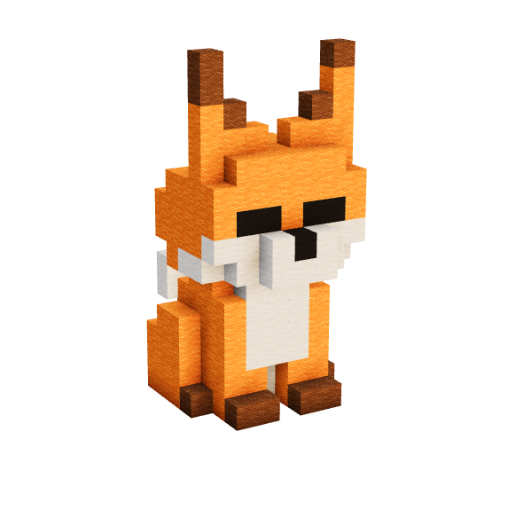
FreePROFreeA playful fox statue that adds personality to woodland bases, animal displays, cozy villages, gardens, and nature-themed builds. #Statues
- EasyDifficulty
- —Blocks
- —Steps
- ~15 minTime
- 10×7 × 15Size
 By
Where is the code? Open this build on your computer and click Phone remote.
Stop alt-tabbing mid-build
Advance the Build It guide from your phone while Minecraft stays open and in focus.
- 1Turn off Fullscreen in MinecraftSo the guide can sit on top of the game
- 2Float the guideA small window that stays over the game
- 3Pair your phone and buildPress NEXT, never leave Minecraft
- 1Move the guide to your second screenDrag this window over, then go full screen
- 2Pair your phoneScan the code with its camera
- 3Press NEXT as you buildEvery press shows the next blocks
Build it yourself, step by step Build guide Build it step by step
Every block in the order to place it. Step through it at your own pace. Every block in order, at your own pace.
Drag to turn it, wheel-drag to move, scroll to zoom- Turn, move and zoomDrag to turn the build, right-drag or wheel-drag to move it, scroll to zoom.
- Step through itUse the arrows or the bar. Each step shows only the blocks to place next.
- Change the stylePick another look in Style at any step: the blocks and the materials list follow.
- Ghost buildSee the blocks of the next steps faintly, so you know where you are going.
- Use your phone as a remotePair your phone and press NEXT without leaving Minecraft.
Comments
Catalogue
You recently viewed Recently viewed
Jump back into a build you opened.
Free this week
Every week the community votes one PRO build open for everyone.
Every week the community votes one PRO build open for everyone.
- 1Pick a buildLook through the builds in this week's vote and open any of them.
- 2Cast your voteOne vote a week, free with an account. Change it any time before the vote closes.
- 3Weekly winnerThe build with the most votes on Monday wins.
- 4Free for 7 daysEveryone can build it for a whole week. Then it goes back to PRO.
A winner sits out the vote for 2 weeks after its free week.
About the Fox Statue About
The Fox Statue is a cute Minecraft fox build that recreates the animal in a larger, decorative form while keeping its familiar blocky appearance. Bright orange blocks form the head and body, contrasted by a white muzzle and chest, dark paws, pointed ears, and simple black facial details. The upright pose gives the fox plenty of personality without making the design overly complicated, making it easy to recognize at a glance.
Its straightforward shape makes this a fun easy Minecraft tutorial for players who want to experiment with animal statues or small decorative builds. Build It’s interactive 3D guide helps with the proportions of the head, ears, face, body, and legs by letting you rotate the statue and inspect each section from different angles as you build.
The Fox Statue fits naturally into forests, taiga areas, gardens, animal displays, server hubs, or whimsical survival worlds. For anyone looking for a Minecraft fox statue tutorial, cute Minecraft build, or small animal statue idea, this design adds a recognizable character to a world without taking up much space.
Also known as fox, fox statue, minecraft fox, fox build, animal statue, animal build, woodland animal, forest animal, cute statue, small statue, mob statue, minecraft mob