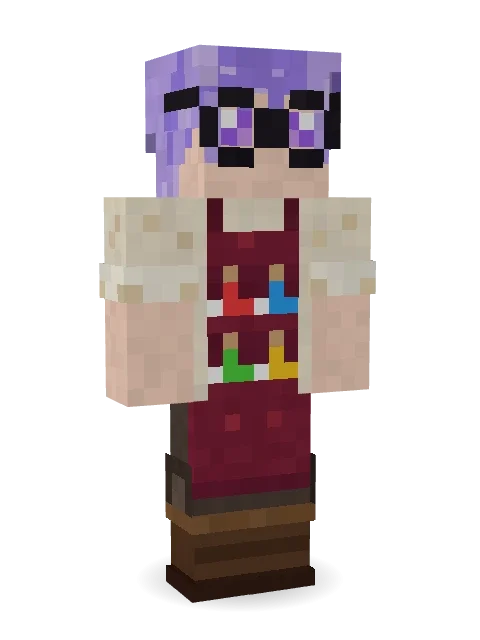
Potion Shopkeeper
Every potion bottled by hand behind the counter: lavender hair in a ponytail, round glasses and a burgundy apron with a potion in every pocket.

How to use this skin
Download it, then follow the steps for where you play.
Minecraft: Java Edition, in the Minecraft Launcher
- Open the Minecraft Launcher and pick Minecraft: Java Edition on the left.
- Open the Skins tab at the top and press New skin.
- Give it a name and choose the player model: Classic.
- Press Browse, pick the PNG you downloaded, then Save & Use.
- Start the game: you are wearing it, on every world and server.
Minecraft: Java Edition, on minecraft.net
- Go to minecraft.net and log in with your Microsoft account.
- Open your Profile and find the skin settings of Java Edition.
- Choose Classic, select the PNG file, and press Upload.
- Your new skin shows the next time you join a world.
Bedrock Edition: Windows, Android, iPhone, iPad, Chromebook
- Open Minecraft and press Dressing Room on the main menu (in newer versions, the character button next to your name, then Edit Character).
- Open the Classic Skins tab.
- Under Owned Skins, press Import, then Choose New Skin.
- Pick the PNG you downloaded (on a phone it is usually in Downloads or Files).
- When it asks, choose Classic, then confirm.
Xbox, PlayStation and Nintendo Switch
Consoles cannot import a skin file. There you can wear Character Creator items and skins from the Marketplace.
Some players set a skin in Bedrock on a phone or PC that is signed in to the same Microsoft account and see it on their console too. Mojang does not support that, so it may not work for you.
More by Build It












Similar skins





















Trending today
What people open and download right now.
Trending today
The skins people are opening, liking and downloading right now.

- Modern HoodiebyBuild It
- Enderbrineby
 gustavopir
- Napoleon BonapartebyBuild It
- Galaxy AxolotlbyBuild It
- The KingbyBuild It
- Hazmat ResponderbyBuild It
- Shy KidbyBuild It
- The VoidbyBuild It
- herobrinebygustavopir
- Starfield PhantombyBuild It
Made on Build It
A few of the skins players made here. Find one you like, or start your own.
 Froggy Onesie
 Cleopatra
 Patchwork Teddy Bear
 Cardboard Robot Kid
 Sleepy Yellow Face
 king herobrine
 Cyber Samurai
 Axolotl Adventurer
 Midnight Academia
 Pistachio Pastry Chef
 Molten Plate Demon
 Pulse Android
 Thunderstorm Mage
 Glowworm Spelunker
 Grey Suit and tie
 Avalanche Rescuer
 Shocked Dog
 Paper Bag Bandit
 Cyan Tinker Fairy
 Gym Bro Banana
 Green Dude
 Noir Detective
 Circuit Board Monk
 Barnyard Cow
 Muddy Farmhand
 Roller Rink Skater
 Muddy Pig
 Graphite Cyborg
 Sweater Weather
 Sleepy Mummy
 Vintage Cartoon Explorer
 Tattered Scarecrow
 Sleepy Koala Student
 Neon Parkour Runner
 Concrete Builder
 Blushing Penguin
 Harvest Farmer
 Build It Guy
 Happy Farmer
 Victorian Gentleman
 Fast Break Baller
 Desert Oracle
 Blue Hood Boy
 Sea Otter
 Drip King
 Bronze Bell Spirit
 Fairy Glow
 Radioactive Gummy Bear
 Desert Courierherobrine
 Captain Saltbeard
 Valentine Cupid
 Bear Lumberjack
 Axolotl Hoodie
 Pumpkin Wraith
 Slime Gamer
 Ghost Buddy
 Espresso Cozy
 Ember Dragon
 Big Grin Face
About Potion Shopkeeper
Potion Shopkeeper is a magical Minecraft skin from the Build It team. It wears a rolled cream shirt, a burgundy potion apron, cargo pants and boots in beige, red and brown. Wear it on fantasy servers, adventure maps and dragon hunts.
Potion Shopkeeper has classic 4 pixel arms and works in Minecraft Java and Bedrock. Download it for free, then follow the steps above to wear it in game. You can also open it in the Build It Skin Maker and make your own version. Try its 7 colour versions too, like Mint hair and Pink hair.
See more in the Fantasy and Streetwear collections, or look through the Aesthetic, Cozy and Cute tags.