Gold Aura Streetwear
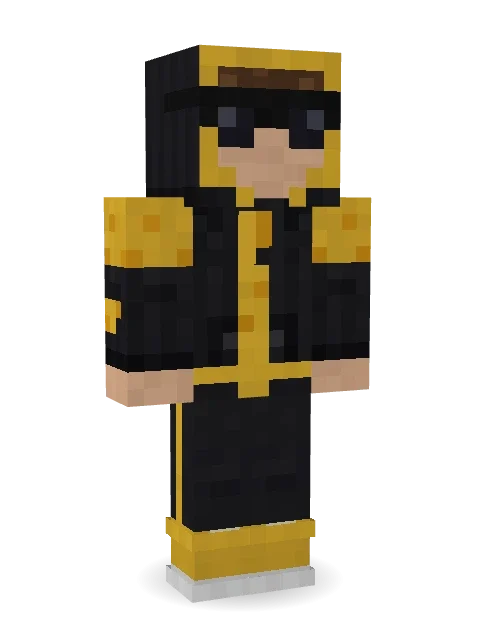
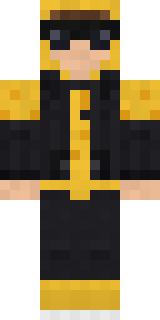
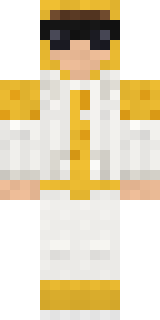
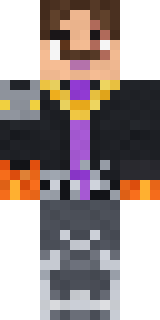
Stands still and lets the outfit do the talking: black sunglasses, a black hood edged in gold, gold shoulders and stripes, and chunky gold high tops.

How to use this skin
Download it, then follow the steps for where you play.
Minecraft: Java Edition, in the Minecraft Launcher
- Open the Minecraft Launcher and pick Minecraft: Java Edition on the left.
- Open the Skins tab at the top and press New skin.
- Give it a name and choose the player model: Classic.
- Press Browse, pick the PNG you downloaded, then Save & Use.
- Start the game: you are wearing it, on every world and server.
Minecraft: Java Edition, on minecraft.net
- Go to minecraft.net and log in with your Microsoft account.
- Open your Profile and find the skin settings of Java Edition.
- Choose Classic, select the PNG file, and press Upload.
- Your new skin shows the next time you join a world.
Bedrock Edition: Windows, Android, iPhone, iPad, Chromebook
- Open Minecraft and press Dressing Room on the main menu (in newer versions, the character button next to your name, then Edit Character).
- Open the Classic Skins tab.
- Under Owned Skins, press Import, then Choose New Skin.
- Pick the PNG you downloaded (on a phone it is usually in Downloads or Files).
- When it asks, choose Classic, then confirm.
Xbox, PlayStation and Nintendo Switch
Consoles cannot import a skin file. There you can wear Character Creator items and skins from the Marketplace.
Some players set a skin in Bedrock on a phone or PC that is signed in to the same Microsoft account and see it on their console too. Mojang does not support that, so it may not work for you.
More by Build It











Similar skins



Trending today
What people open and download right now.
Trending today
The skins people are opening, liking and downloading right now.
- Modern HoodiebyBuild It
- Galaxy AxolotlbyBuild It
- Enderbrineby
 gustavopir
- Napoleon BonapartebyBuild It
- Shy KidbyBuild It
- Hazmat ResponderbyBuild It
- The VoidbyBuild It
- The KingbyBuild It
- Slender ManbyBuild It
- herobrinebygustavopir
Made on Build It
A few of the skins players made here. Find one you like, or start your own.
 Error
 Vampire Hunter
 Frost Yeti
 Tattered Scarecrow
 Orc Warrior
 Red Hoodie
 Koi Pond Spirit
 Autumn Knit
 Hallway ShadowStarfield Phantom
 Orangutan Archaeologist
 Tennis Ball Coach
 Gargoyle Bell Ringer
 Concrete Builder
 Berg
 Celestial Monk
 Night Market Merchant
 Chili Stunt Driver
 Neon Mohawk Punk
 Happy Hot Dog
 Beetroot DJCrystal Cave Explorer
 Lime Alien Astronaut
 Pulse Android
 Hospital Hero
 Burgundy Buccaneer
 Living Marble Statue
 Lord PumpkinThe King
 Star Striker
 Cheeky BananaNapoleon Bonaparte
 Axolotl Adventurer
 Goblin Raider
 Ender Shade
 Mint Axolotl
 Sleepy Koala Student
 Shroud Ghost
 Night Ops Commando
 Smug Star Wizard
 Snow Rider
 Fairy Glow
 Bronze Bell Spirit
 Snow Leopard
 Moon WalkerArmy Soldier
 Desert Djinn
 Dungeon AccountantSteampunk Inventor
 Crystal Elf Spellcaster
 Sky Pirate
 Origami Crane Warrior
 Cyan Tinker Fairy
 Prom Queen Zombie
 Flamehunter
 Christmas Gingerbread
 Lotus Temple Guardian
 Thunderstorm Mage
 Burlap Intruder
 leo
About Gold Aura Streetwear
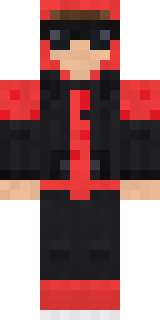
Gold Aura Streetwear is a street style skin for Minecraft from the Build It team. The outfit: a gold trim aura hoodie, joggers, high tops and sunglasses, mostly black with touches of yellow. An easy everyday look for survival, minigames and hanging out with friends.
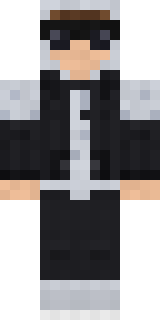
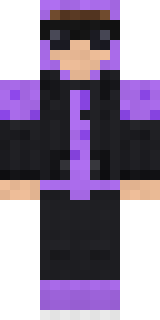
It uses the classic arms (4 pixels wide, like Steve) and works on Java and Bedrock. Download it for free, then follow the steps above to wear it in game. You can also open it in the Build It Skin Maker and make your own version. Try its 7 colour versions too, like Silver aura and Purple aura.
See more in the Streetwear collection, or browse the Cool, Hoodie and Street tags.