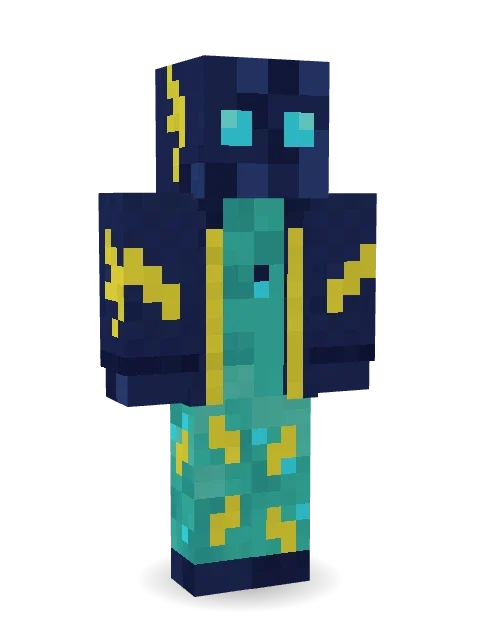
Electric Eel Technician
Fixes the reef wiring with bare hands: a navy eel with glowing cyan eyes, a teal belly, lightning bolts everywhere and a navy work jacket.

How to use this skin
Download it, then follow the steps for where you play.
Minecraft: Java Edition, in the Minecraft Launcher
- Open the Minecraft Launcher and pick Minecraft: Java Edition on the left.
- Open the Skins tab at the top and press New skin.
- Give it a name and choose the player model: Classic.
- Press Browse, pick the PNG you downloaded, then Save & Use.
- Start the game: you are wearing it, on every world and server.
Minecraft: Java Edition, on minecraft.net
- Go to minecraft.net and log in with your Microsoft account.
- Open your Profile and find the skin settings of Java Edition.
- Choose Classic, select the PNG file, and press Upload.
- Your new skin shows the next time you join a world.
Bedrock Edition: Windows, Android, iPhone, iPad, Chromebook
- Open Minecraft and press Dressing Room on the main menu (in newer versions, the character button next to your name, then Edit Character).
- Open the Classic Skins tab.
- Under Owned Skins, press Import, then Choose New Skin.
- Pick the PNG you downloaded (on a phone it is usually in Downloads or Files).
- When it asks, choose Classic, then confirm.
Xbox, PlayStation and Nintendo Switch
Consoles cannot import a skin file. There you can wear Character Creator items and skins from the Marketplace.
Some players set a skin in Bedrock on a phone or PC that is signed in to the same Microsoft account and see it on their console too. Mojang does not support that, so it may not work for you.
More by Build It












Similar skins




















Trending today
What people open and download right now.
Trending today
The skins people are opening, liking and downloading right now.
- Ancient Hexby
 nvlr33
- Modern HoodiebyBuild It
- Shy KidbyBuild It
- Galaxy AxolotlbyBuild It
- Napoleon BonapartebyBuild It
- The KingbyBuild It
- Hazmat ResponderbyBuild It
- The VoidbyBuild It
- Buff ChickenbyBuild It
- Slender ManbyBuild It
Made on Build It
A few of the skins players made here. Find one you like, or start your own.
 Rainy Day
 Silverfish ArchivistGalaxy Axolotl
 Balduíno IV
 Pistachio Pastry Chef
 Silver Moon
 Sage Green Cozy
 Crystal Cave Explorer
 Lacquered Samurai
 Crocodile Detective
 One Brain Cell Cat
 Bebo
 Captain Saltbeard
 Carnival Fortune Teller
 Sky Pirate
 Ace Pilot
 Lakeside Angler
 Axolotl Cutie
 Caramel Knight
 Background Extra
 Pumpkin Hoodie
 Pitch Playmaker
 Wolfgang Amadeus MozartGamer Mode
 Pastel Goth
 Laurel Angel
 Nikola Tesla
 Teddy Onesie
 Mysterious Astronaut
 Lobster Lifeguard
 Deep Sea Captain
 Fairy Glow
 Lavender Florist
 Mole Miner
 Mountain Shepherd
 Slime Apprentice
 Crystal Monk
 Grumpy Thundercloud
 Head Chef
 Avalanche Rescuer
 The Big Cheese
 Slime Gamer
 Gummy Bear Bodybuilder
 Cozy Avocado
 Captain Spark
 Tropical Fish
 Geode Elf
 Easter Egg Sweater
 Cobalt Firefighter
 Red Orchard vine shirt
 Goblin Raider
 Sunny SurferCrow Undertaker
 Armadillo Mercenary
 Forest Druid
 Grumpy Broccoli
 Terracotta Summer
 Forest Ranger
 Pajama Knight
 Violet Samurai
About Electric Eel Technician
Electric Eel Technician is a critter Minecraft skin made by the Build It team. It wears an eel bolt jacket in blue, teal and yellow. It is an electric eel from head to toe. Take it exploring through forests, jungles and snowy plains.
It uses the classic arms (4 pixels wide, like Steve) and works on Java and Bedrock. Download it for free and upload it in the Minecraft Launcher or the Bedrock dressing room. Open it in the Build It Skin Maker to give it your own colours. Try its 7 colour versions too, like Abyss eel and Coral eel.
Find more skins like it in the Animals and Streetwear collections, or browse the Animal, Cool and Ocean tags.