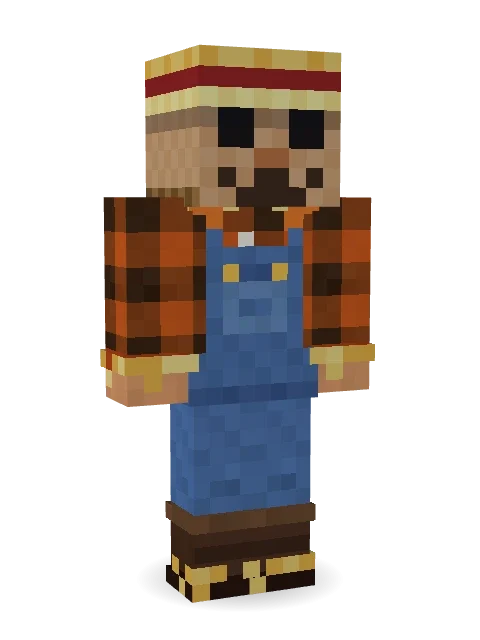
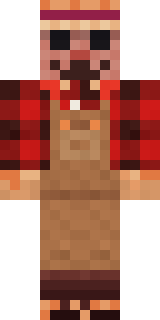
Field Scarecrow
Stuffed with straw and keeping an eye on the pumpkin patch.

How to use this skin
Download it, then follow the steps for where you play.
Minecraft: Java Edition, in the Minecraft Launcher
- Open the Minecraft Launcher and pick Minecraft: Java Edition on the left.
- Open the Skins tab at the top and press New skin.
- Give it a name and choose the player model: Classic.
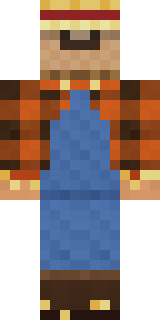
- Press Browse, pick the PNG you downloaded, then Save & Use.
- Start the game: you are wearing it, on every world and server.
Minecraft: Java Edition, on minecraft.net
- Go to minecraft.net and log in with your Microsoft account.
- Open your Profile and find the skin settings of Java Edition.
- Choose Classic, select the PNG file, and press Upload.
- Your new skin shows the next time you join a world.
Bedrock Edition: Windows, Android, iPhone, iPad, Chromebook
- Open Minecraft and press Dressing Room on the main menu (in newer versions, the character button next to your name, then Edit Character).
- Open the Classic Skins tab.
- Under Owned Skins, press Import, then Choose New Skin.
- Pick the PNG you downloaded (on a phone it is usually in Downloads or Files).
- When it asks, choose Classic, then confirm.
Xbox, PlayStation and Nintendo Switch
Consoles cannot import a skin file. There you can wear Character Creator items and skins from the Marketplace.
Some players set a skin in Bedrock on a phone or PC that is signed in to the same Microsoft account and see it on their console too. Mojang does not support that, so it may not work for you.
More by Build It












Similar skins



















Trending today
What people open and download right now.
Trending today
The skins people are opening, liking and downloading right now.

- Modern HoodiebyBuild It
- Ancient Hexby
 nvlr33
- Galaxy AxolotlbyBuild It
- Shy KidbyBuild It
- Napoleon BonapartebyBuild It
- The KingbyBuild It
- Hazmat ResponderbyBuild It
- The VoidbyBuild It
- Buff ChickenbyBuild It
- Slender ManbyBuild It
Made on Build It
A few of the skins players made here. Find one you like, or start your own.
 Black Moth Entity
 Ballroom Dancer
 Sleepy Yellow Face
 Field Scarecrow
 Parrot Captain
 Buffalo Plaid Lumberjack
 Beach Day
 Frost Court Noble
 Emerald Alchemist
 The Boss
 Pumpkin Wraith
 Midfield Maestro
 Bouncy Prince slime
 Blue Hood Boy
 Medieval Scribe
 Sunflower Drummer
 Dungeon Accountant
 Cheeseburger Buddy
 Lotus Temple GuardianShy Kid
 Stained-Glass Paladin
 Forest BigfootThe Void
 Emotional Support Pickle
 Stars and Stripes
 Sunny SurferHallway Shadow
 Clockwork Owl
 Glowworm SpelunkerShroud Ghost
 Candy Baker
 Soft Boy
 Grey Suit and tie
 Balduíno IV
 Nikola Tesla
 Night Market Merchant
 Head Chef
 Alien Tourist
 Cactus Outlaw
 Friendly Dentist
 Espresso Cozy
 Balloon Festival Pilot
 Chameleon Hoodie
 Pumpkin Hoodie
 Watermelon Brawler
 Alien Exchange StudentBrown Bear
 Brown Steampunk coat Muscled wrestler
 Cool Shades Face
 Red Hoodie
 Scuba Instructor
 Spider Silk Merchant
 Bebo
 Midnight Academia
 Crimson Sash Ninja
 Lime Alien Astronaut
 Graphite Cyborg
 Ember LibrarianBouncy Slime
 Porcelain Robot
About Field Scarecrow
Meet Field Scarecrow, a Halloween-ready Minecraft skin from the Build It team. The outfit: a flannel, overalls, boots and straw tufts in blue, brown and orange. A good pick for scary servers and spooky season.
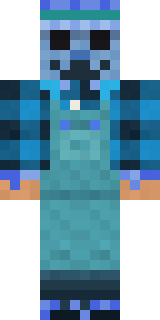
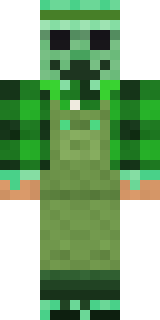
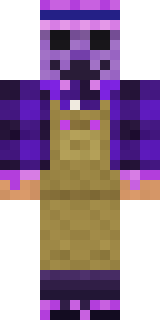
Field Scarecrow has classic 4 pixel arms and works in Minecraft Java and Bedrock. Download it for free, then follow the steps above to wear it in game. You can also open it in the Build It Skin Maker and make your own version. Try its 5 colour versions too, like Ocean and Forest.
See more in the Spooky and Funny collections, or look through the Funny, Nature and Spooky tags.