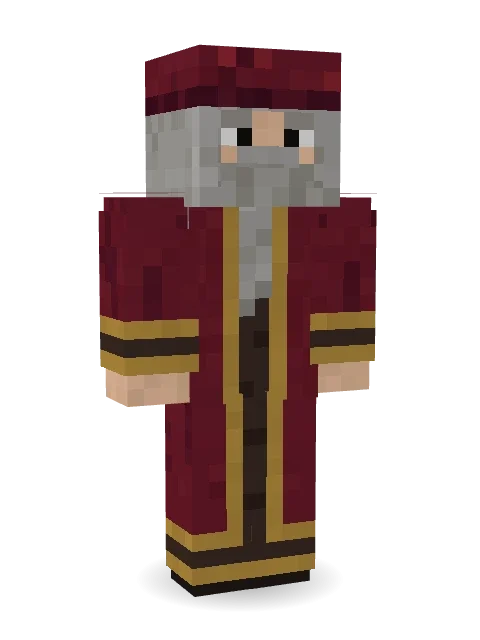
Leonardo da Vinci
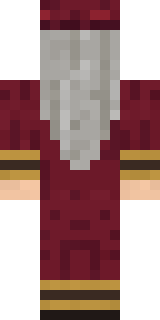
Painter, inventor, genius: a soft crimson cap, long grey hair and a flowing grey beard, and a crimson robe edged in gold.
How to use this skin
Download it, then follow the steps for where you play.
Minecraft: Java Edition, in the Minecraft Launcher
- Open the Minecraft Launcher and pick Minecraft: Java Edition on the left.
- Open the Skins tab at the top and press New skin.
- Give it a name and choose the player model: Classic.
- Press Browse, pick the PNG you downloaded, then Save & Use.
- Start the game: you are wearing it, on every world and server.
Minecraft: Java Edition, on minecraft.net
- Go to minecraft.net and log in with your Microsoft account.
- Open your Profile and find the skin settings of Java Edition.
- Choose Classic, select the PNG file, and press Upload.
- Your new skin shows the next time you join a world.
Bedrock Edition: Windows, Android, iPhone, iPad, Chromebook
- Open Minecraft and press Dressing Room on the main menu (in newer versions, the character button next to your name, then Edit Character).
- Open the Classic Skins tab.
- Under Owned Skins, press Import, then Choose New Skin.
- Pick the PNG you downloaded (on a phone it is usually in Downloads or Files).
- When it asks, choose Classic, then confirm.
Xbox, PlayStation and Nintendo Switch
Consoles cannot import a skin file. There you can wear Character Creator items and skins from the Marketplace.
Some players set a skin in Bedrock on a phone or PC that is signed in to the same Microsoft account and see it on their console too. Mojang does not support that, so it may not work for you.
More by Build It












Similar skins














Trending today
What people open and download right now.
Trending today
The skins people are opening, liking and downloading right now.



- Modern HoodiebyBuild It
- Galaxy AxolotlbyBuild It
- Enderbrineby
 gustavopir
- Napoleon BonapartebyBuild It
- The VoidbyBuild It
- Shy KidbyBuild It
- Slender ManbyBuild It
- The KingbyBuild It
- Buff ChickenbyBuild It
- Abyssal MonkbyBuild It
Made on Build It
A few of the skins players made here. Find one you like, or start your own.
 Water Elemental
 Auburn Diner Waitress
 Rubber Duck Raincoat
 Pulse Android
 Violet Samurai
 Alien Tourist
 Shocked Dog
 Anglerfish Bouncer
 Goblin Raider
 Downtown Pig
 Santa Claus
 Gothic Librarian
 Mango Skate PunkSlender Man
 Lick
 Snow RiderDreamweaver
 Geode Elf
 Street SkaterCount Dracula
 Pumpkin Patch Farmer
 Lunar Botanist
 Lunar New Year Celebrant
 Charcoal Firefighter
 Amethyst Mage
 Crimson Sash Ninja
 Living Popcorn Box
 Lord Pumpkin
 Chrome Mannequin
 Octopus Stage MagicianHazmat Responder
 Ghost Concierge
 Beach Lifeguard
 Cozy Avocado
 Glacial Sorcerer
 Cherry Blossom Streetwear
 Veiled Mourner
 Panda Pal
 Astronaut
 Paper Bag Bandit
 Axolotl Adventurer
 Ronin Samurai
 Captain Spark
 Easter Bunny CostumeRetired Adventurer
 Hard Hat Hero
 Monochrome Minimalist
 Camo Commando
 Strawberry Jam JarTemplar Knight
 Snow Leopard
 Cool Shades Face
 Yellow Scrubs
 Sleepy Mummy
 Vooid
 Forgotten Funeral Guest
 Beekeeper
 Chameleon Hoodie
 Business Shark
 herobrine
About Leonardo da Vinci
Meet Leonardo da Vinci, a work Minecraft skin made by the Build It team. It wears a renaissance robe and a renaissance cap, mostly red with touches of orange and brown. Every town needs one, and now yours has it.
It uses the classic arms (4 pixels wide, like Steve) and works on Java and Bedrock. Download it for free, then follow the steps above to wear it in game. Want it your way? Open it in the Build It Skin Maker and change its colours and pieces. Try its 7 colour versions too, like Azure and Forest.
Find more skins like it in the Fantasy and History collections, or browse the Artist, History and Legend tags.