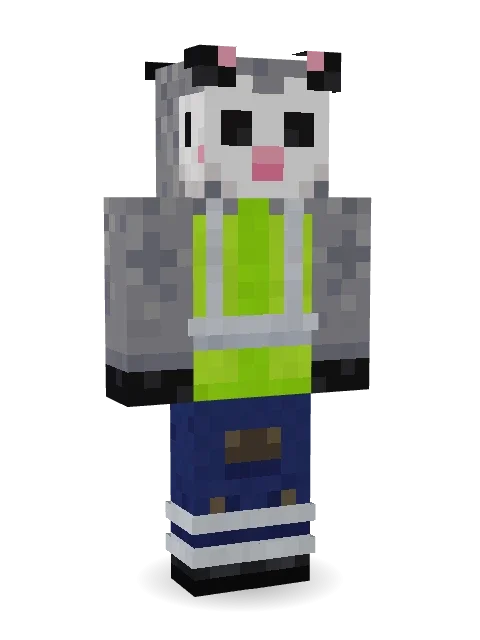
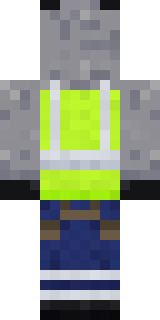
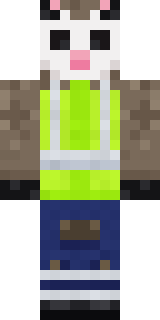
Possum Garbage Collector
Out before sunrise and loving every bin: a grey possum in a lime hi vis vest and grimy work trousers, pink nose sniffing for treasure.

How to use this skin
Download it, then follow the steps for where you play.
Minecraft: Java Edition, in the Minecraft Launcher
- Open the Minecraft Launcher and pick Minecraft: Java Edition on the left.
- Open the Skins tab at the top and press New skin.
- Give it a name and choose the player model: Classic.
- Press Browse, pick the PNG you downloaded, then Save & Use.
- Start the game: you are wearing it, on every world and server.
Minecraft: Java Edition, on minecraft.net
- Go to minecraft.net and log in with your Microsoft account.
- Open your Profile and find the skin settings of Java Edition.
- Choose Classic, select the PNG file, and press Upload.
- Your new skin shows the next time you join a world.
Bedrock Edition: Windows, Android, iPhone, iPad, Chromebook
- Open Minecraft and press Dressing Room on the main menu (in newer versions, the character button next to your name, then Edit Character).
- Open the Classic Skins tab.
- Under Owned Skins, press Import, then Choose New Skin.
- Pick the PNG you downloaded (on a phone it is usually in Downloads or Files).
- When it asks, choose Classic, then confirm.
Xbox, PlayStation and Nintendo Switch
Consoles cannot import a skin file. There you can wear Character Creator items and skins from the Marketplace.
Some players set a skin in Bedrock on a phone or PC that is signed in to the same Microsoft account and see it on their console too. Mojang does not support that, so it may not work for you.
More by Build It












Similar skins


















Trending today
What people open and download right now.
Trending today
The skins people are opening, liking and downloading right now.



- Modern HoodiebyBuild It
- Enderbrineby
 gustavopir
- Galaxy AxolotlbyBuild It
- Napoleon BonapartebyBuild It
- Shy KidbyBuild It
- The KingbyBuild It
- Hazmat ResponderbyBuild It
- herobrinebygustavopir
- The VoidbyBuild It
- Starfield PhantombyBuild It
Made on Build It
A few of the skins players made here. Find one you like, or start your own.
 Cobalt Firefighter
 Bookworm
 Nice girl
 Gym Bro Banana
 Dandelion Druid
 Red Court frock coat
 Happy Farmer
 Templar Knight
 Drifter Gunslinger
 Red Hoodie
 Tattered Reaper
 Bumpy Pickle
 Cactus Outlaw
 Volcanic Sentinel
 Trick or Treat Ghost
 Shrimp Mechanic
 Grey Suit and tie
 Emo Kid
 Valentine Cupid
 Spotted Fawn
 Patchwork Teddy Bear
 Cursed Chess Bishop
 Red Orchard vine shirt
 Cobalt Cyber Ninja
 Night Market Merchant
 Scarlet Sellsword
 Obsidian Sentinel
 Poseidon
 Ironwood Druid
 Auburn Diner Waitress
 Grey Tattered reaper robe
 Patrol OfficerGalaxy Axolotl
 Moon Ranger
 Otter Fisher
 Steampunk Inventor
 Cotton Candy Vendor
 Ladybug Mechanic
 miner in a suit and tie
 Business Shark
 Mango Skate Punk
 Potion Shopkeeper
 Market Butcher
 Gentle Giraffe
 Champion Boxer
 Neon Mohawk Punk
 Copper Engineer
 Saloon Pianist
 the winter cat skin
 The Boss
 Arcade Janitor
 Orange Jelly Ninja
 Grey Rune stripe hoodie
 Honeycomb Automaton
 Highway Biker
 Sherlock Holmes
 Sweater Weather
 Obsidian Knight
 Bistro Chef
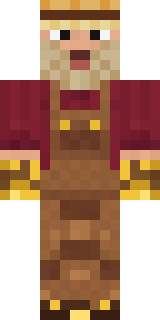 Golden Prospector
About Possum Garbage Collector
Possum Garbage Collector is an animal Minecraft skin from the Build It team. It wears a possum hi vis vest, grimy work trousers and short black work boots, mostly grey with touches of green and blue. Under the outfit it is a grey possum. Great for players who love animals, farms and cozy builds.
Possum Garbage Collector has classic 4 pixel arms and works in Minecraft Java and Bedrock. It is free: download the PNG and add it in the Minecraft Launcher (Java) or the dressing room (Bedrock). Want it your way? Open it in the Build It Skin Maker and change its colours and pieces. It also comes in 7 colour versions, like Orange vest and Yellow vest.
See more in the Animals and Jobs collections, or look through the Animal, Cute and Funny tags.