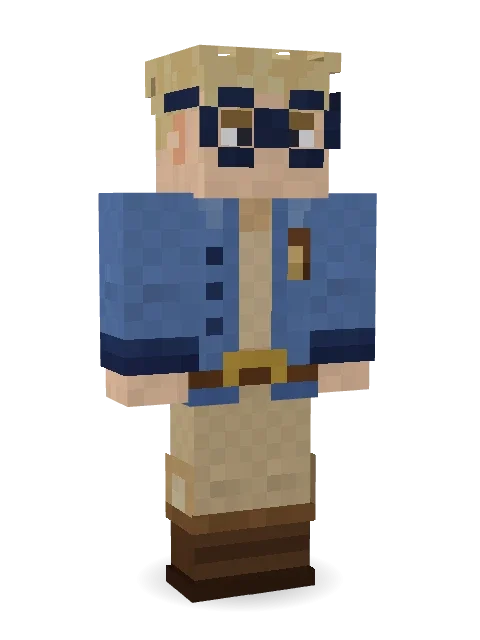
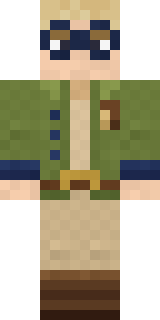
Fossil Museum Curator
Knows the name of every bone in the hall: sandy hair, thick dark glasses, a dusty blue field jacket with an ammonite pin, khaki trousers and boots.
How to use this skin
Download it, then follow the steps for where you play.
Minecraft: Java Edition, in the Minecraft Launcher
- Open the Minecraft Launcher and pick Minecraft: Java Edition on the left.
- Open the Skins tab at the top and press New skin.
- Give it a name and choose the player model: Classic.
- Press Browse, pick the PNG you downloaded, then Save & Use.
- Start the game: you are wearing it, on every world and server.
Minecraft: Java Edition, on minecraft.net
- Go to minecraft.net and log in with your Microsoft account.
- Open your Profile and find the skin settings of Java Edition.
- Choose Classic, select the PNG file, and press Upload.
- Your new skin shows the next time you join a world.
Bedrock Edition: Windows, Android, iPhone, iPad, Chromebook
- Open Minecraft and press Dressing Room on the main menu (in newer versions, the character button next to your name, then Edit Character).
- Open the Classic Skins tab.
- Under Owned Skins, press Import, then Choose New Skin.
- Pick the PNG you downloaded (on a phone it is usually in Downloads or Files).
- When it asks, choose Classic, then confirm.
Xbox, PlayStation and Nintendo Switch
Consoles cannot import a skin file. There you can wear Character Creator items and skins from the Marketplace.
Some players set a skin in Bedrock on a phone or PC that is signed in to the same Microsoft account and see it on their console too. Mojang does not support that, so it may not work for you.
More by Build It












Similar skins






















Trending today
What people open and download right now.
Trending today
The skins people are opening, liking and downloading right now.

- Modern HoodiebyBuild It
- Enderbrineby
 gustavopir
- Napoleon BonapartebyBuild It
- Galaxy AxolotlbyBuild It
- The KingbyBuild It
- Shy KidbyBuild It
- Hazmat ResponderbyBuild It
- The VoidbyBuild It
- herobrinebygustavopir
- Starfield PhantombyBuild It
Made on Build It
A few of the skins players made here. Find one you like, or start your own.
 Champion Boxer
 Medieval Cobbler
 Penguin Waddle
 Circuit Board Monk
 Leonardo da Vinci
 Desert Astronomer
 Porcelain Robot
 Barnyard Cow
 Candy Baker
 Star Striker
 Golden Automaton
 Cozy AvocadoCourtroom Judge
 Sunflower Drummer
 Geode Elf
 Isaac Newton
 Templar Knight
 Chameleon Hoodie
 Bear Lumberjack
 Peach Orchard Spirit
 Fern Forest Sprite
 Peach Sunset
 Blue Beat
 Tattered Scarecrow
 Disco ChameleonThe Void
 Charcoal Firefighter
 Veiled MournerMoonwalk Astronaut
 Red PandaShy Kid
 Soft Boy
 Cheeseburger BuddyNapoleon Bonaparte
 Bronze Bell Spirit
 Terracotta Turtle
 Caramel Knight
 The Mummy
 Matcha Cafe
 Pulse Android
 Malachite Golem
 Panda Pal
 Bookstore Owner
 Pistachio Pastry Chef
 Happy lawyer
 Grey Suit and tie
 Axolotl Adventurer
 Ruby Dragonborn
 Ruby Blacksmith
 Honey Bee
 Pumpkin Wraith
 Halloween Vampire
 Rainbow Paint Can
 Twilight Rogue
 Mountain Shepherd
 Tin Toy Soldier
 Hospital Hero
 Living Popcorn Box
 The Boss
 Retro Fridge Robot
About Fossil Museum Curator
Fossil Museum Curator is a work skin for Minecraft made by the Build It team. It wears a curator field jacket, cargo pants, boots and a belt in blue and brown. It shows up ready for work on any server.
It uses the classic arms (4 pixels wide, like Steve) and works on Java and Bedrock. Download it for free, then follow the steps above to wear it in game. You can also open it in the Build It Skin Maker and make your own version. It also comes in 7 colour versions, like Olive field jacket and Brown field jacket.
Find more skins like it in the Streetwear and Jobs collections, or browse the Casual, Explorer and Scholar tags.