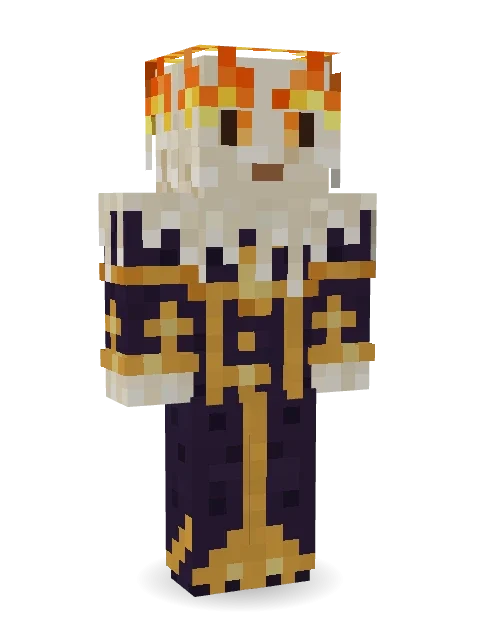
Living Candle Magician
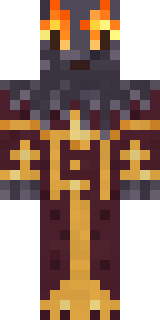
A magician made of candle wax, melting under a crown of flame, glowing eyes peering out of the drips. Gold-trimmed robes, slowly dripping.

How to use this skin
Download it, then follow the steps for where you play.
Minecraft: Java Edition, in the Minecraft Launcher
- Open the Minecraft Launcher and pick Minecraft: Java Edition on the left.
- Open the Skins tab at the top and press New skin.
- Give it a name and choose the player model: Classic.
- Press Browse, pick the PNG you downloaded, then Save & Use.
- Start the game: you are wearing it, on every world and server.
Minecraft: Java Edition, on minecraft.net
- Go to minecraft.net and log in with your Microsoft account.
- Open your Profile and find the skin settings of Java Edition.
- Choose Classic, select the PNG file, and press Upload.
- Your new skin shows the next time you join a world.
Bedrock Edition: Windows, Android, iPhone, iPad, Chromebook
- Open Minecraft and press Dressing Room on the main menu (in newer versions, the character button next to your name, then Edit Character).
- Open the Classic Skins tab.
- Under Owned Skins, press Import, then Choose New Skin.
- Pick the PNG you downloaded (on a phone it is usually in Downloads or Files).
- When it asks, choose Classic, then confirm.
Xbox, PlayStation and Nintendo Switch
Consoles cannot import a skin file. There you can wear Character Creator items and skins from the Marketplace.
Some players set a skin in Bedrock on a phone or PC that is signed in to the same Microsoft account and see it on their console too. Mojang does not support that, so it may not work for you.
More by Build It












Similar skins


















Trending today
What people open and download right now.
Trending today
The skins people are opening, liking and downloading right now.


- Modern HoodiebyBuild It
- Ancient Hexby
 nvlr33
- Galaxy AxolotlbyBuild It
- Napoleon BonapartebyBuild It
- Shy KidbyBuild It
- The KingbyBuild It
- Hazmat ResponderbyBuild It
- The VoidbyBuild It
- Buff ChickenbyBuild It
- Slender ManbyBuild It
Made on Build It
A few of the skins players made here. Find one you like, or start your own.
 Desert Oracle
 Build It Guy
 Rookie Boxer
 Banana Gentleman
 Grey Suit and tie
 Jesus Christ
 Matcha Mochi
 Yellow hazmat suit
 Realistic ParrotX2
 Sunflower Drummer
 Dino Onesie
 Moon Ranger
 Pumpkin Spice
 Ember Librarian
 Main Character Duck
 Moonwalk Astronaut
 Scuba Instructor
 Pajama Knight
 Formal Vampire
 Peach Sunset
 Desert Rose
 Rodeo Star
 Jake
 Gummy Bear BodybuilderHallway Shadow
 Redstone Inventor
 Cocoa Monkey
 Cyberpunk Paramedic
 Valentine Cupid
 Noir Detective
 CM Style
 Mysterious Astronaut
 Pitch Playmaker
 Jellybean Thief
 Watermelon Wrestler
 Slime Gamer
 Malachite Golem
 Gym Bro Banana
 Grunge Girl
 Fox Blacksmith
 Sunken Knight
 Alice
 Crimson Templar
 Sunflower Scarecrow
 Tuxedo Cat
 Berg
 Rich baddie
 Patchwork Plush Monster
 Sage Apron Florist
 Count Nightfall
 Obsidian Sentinel
 Sweater Weather
 Fern Forest Sprite
 Veiled Mourner
 Wolfgang Amadeus Mozart
 Ghost Buddy
 Little Bat
 Grumpy Thundercloud
 Coral Mermaid
 Rainbow Paint Can
About Living Candle Magician
Living Candle Magician is a Halloween-ready skin for Minecraft made by the Build It team. Its look puts together a gold-trimmed robe, a flame crown and a dripping wax with a purple and orange colour scheme. It is a living candle from head to toe. Wear it to creep through dark caves and abandoned mansions.
Living Candle Magician has classic 4 pixel arms and works in Minecraft Java and Bedrock. It is free: download the PNG and add it in the Minecraft Launcher (Java) or the dressing room (Bedrock). Open it in the Build It Skin Maker to give it your own colours. Try its 7 colour versions too, like Blue flame and Green flame.
Find more skins like it in the Spooky and Fantasy collections, or look through the Fantasy, Halloween and Mystery tags.