Peppermint Mechanic
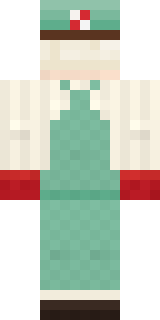
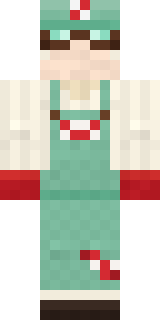
Fixes anything with a wrench and a sweet tooth: a mint cap and overalls, round goggles, candy patches everywhere and bright red gloves.

How to use this skin
Download it, then follow the steps for where you play.
Minecraft: Java Edition, in the Minecraft Launcher
- Open the Minecraft Launcher and pick Minecraft: Java Edition on the left.
- Open the Skins tab at the top and press New skin.
- Give it a name and choose the player model: Classic.
- Press Browse, pick the PNG you downloaded, then Save & Use.
- Start the game: you are wearing it, on every world and server.
Minecraft: Java Edition, on minecraft.net
- Go to minecraft.net and log in with your Microsoft account.
- Open your Profile and find the skin settings of Java Edition.
- Choose Classic, select the PNG file, and press Upload.
- Your new skin shows the next time you join a world.
Bedrock Edition: Windows, Android, iPhone, iPad, Chromebook
- Open Minecraft and press Dressing Room on the main menu (in newer versions, the character button next to your name, then Edit Character).
- Open the Classic Skins tab.
- Under Owned Skins, press Import, then Choose New Skin.
- Pick the PNG you downloaded (on a phone it is usually in Downloads or Files).
- When it asks, choose Classic, then confirm.
Xbox, PlayStation and Nintendo Switch
Consoles cannot import a skin file. There you can wear Character Creator items and skins from the Marketplace.
Some players set a skin in Bedrock on a phone or PC that is signed in to the same Microsoft account and see it on their console too. Mojang does not support that, so it may not work for you.
More by Build It












Similar skins











Trending today
What people open and download right now.
Trending today
The skins people are opening, liking and downloading right now.

- Ancient Hexby
 nvlr33
- Modern HoodiebyBuild It
- Galaxy AxolotlbyBuild It
- Shy KidbyBuild It
- The KingbyBuild It
- Napoleon BonapartebyBuild It
- Hazmat ResponderbyBuild It
- The VoidbyBuild It
- Buff ChickenbyBuild It
- Slender ManbyBuild It
Made on Build It
A few of the skins players made here. Find one you like, or start your own.
Pastel Bear Girl Chili Stunt Driver
 Porcelain Robot
 Dino Onesie
 Ember Demon
 Moon Elf
 Laurel Angel
 Silver Pulse DJ
 Electrician
 Bloody ghost
 Ladybug Mechanic
 Glowworm Spelunker
 Marmot Mountain Climber
 Honey Bot
 Curly Barista
 Peppermint Mechanic
 Veiled Mourner
 Soft Boy
 Golden Automaton
 Red Flame Luchador
 Crystal Cave Explorer
 Haunted Arcade Robot
 Inmate 3742
 Bouncy Prince slime
 Rodeo Star
 Midnight Academia
 Alien Exchange Student
 Astronaut
 Pumpkin Spice
 Coral Reef Sorceress
 Tennis Ball Coach
 Ice Crystal Spirit
 Federal Agent
 Dungeon Accountant
 Formal VampirePumpkin Patch Farmer
 Burnt Toast Monster
 Dune Racer
 Muddy Pig
 Slime Park Ranger
 One Brain Cell Cat
 Bookworm
 Black
 Peach Sunset
 Unimpressed Office Clerk
 Waldo Buhonero
 Shadow Ninja
 Ward Doctor
 Porcelain Knight
 Tiger Champ
 Living Chess King
 Slime Gamer
 Paper Lantern Spirit
 Strawberry Cow
 Prom Queen Zombie
 Joan of Arc
 Roller Rink Attendant
 Carnival Fortune Teller
 Lone WolfThe Forehead Man
About Peppermint Mechanic
Peppermint Mechanic is a food Minecraft skin from the Build It team. Its look puts together a candy patch shirt, peppermint overalls, sneakers and a peppermint goggle cap, mostly green with touches of yellow. A silly pick for minigames, parkour and party servers.
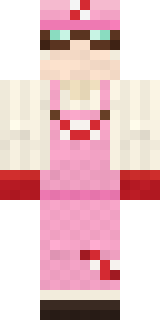
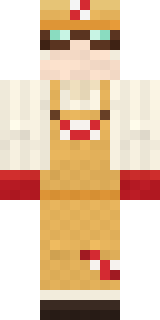
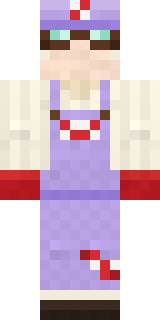
Peppermint Mechanic has classic 4 pixel arms and works in Minecraft Java and Bedrock. Download it for free and upload it in the Minecraft Launcher or the Bedrock dressing room. Want it your way? Open it in the Build It Skin Maker and change its colours and pieces. Try its 7 colour versions too, like Bubblegum and Butterscotch.
See more in the Food and Streetwear collections, or look through the Casual, Cute and Food tags.